Saturday, 30 September 2023

Understanding Default , Static and Floating Static Routing

1) Default Routing:

Default routing is a method used by routers to forward packets when there is no specific route entry in the routing table for the destination network. Instead of dropping the packet, the router forwards it based on a pre-defined default route. This route is often referred to as the "gateway of last resort" or "default gateway".


For example, if a router receives a packet for a network it doesn't have a specific route for, it will use the default route to send the packet to another router or gateway that has a better understanding of where to send it next.


Default routes are useful in cases where a router doesn't have specific knowledge of all possible networks but knows at least one router that does.

2) Static Routing:

Static routing involves manually configuring the routes in a router's routing table. These routes are configured by a network administrator.


With static routing, the routes don't change unless a network administrator makes changes to them. It's a simple and efficient method for small networks where the network topology doesn't change frequently.


Static routing is less flexible than dynamic routing protocols (like OSPF, EIGRP, BGP, etc.) because it doesn't adapt to changes in the network automatically. It's typically used in scenarios where the network is relatively stable.

3)Floating Static Routing:

Floating static routing is a technique used to provide a backup or secondary route in case the primary route  becomes unavailable.

It involves configuring a static route with a higher administrative distance so that it is less preferred than other routes in the routing table. If the primary route fails, the floating static route becomes active.

This is commonly used as a backup solution in case the primary connection to a network goes down. 

In summary, default routing is used when no specific route is available, static routing involves manually configuring routes, and floating static routing provides a backup route in case the primary route fails. Each of these techniques has its own use cases and benefits depending on the network environment and requirements.


Tuesday, 19 September 2023

Port Security

+ Port Security is a important feature in Switches.

+ Network Admin is responsible for protecting switchports from unauthorized access.

+ Security Breach happens when someone try to connect there own devices/laptops to office internal switch. 

+So how to protect Internal Network Switchports from unauthorized access, rather what is that thing which would helps Network Admin to achieve Switchport Security. 

  THE ANSWER IS " MAC -ADDRESS"

+ Yes , on basis of MAC Address Network Admin can restrict / allow workstations to access the internal network of the organization.

What all things can a Network Admin control using Port Security - 

+ Limit Max Mac Addresses allowed on the switchport. 

Default value is 1

+ Configure the  MAC address to be allowed on the switchport- 

this can be done Static or  Dynamic (Sticky) 

Static - Means Network Admin define by own which MAC address to be allowed on the switchport.

Dynamic (Sticky) - Dynamic MAC address is learned on the switchport is recorded and that MAC address/es are not only allowed on the switchport.

+ Configure Violation Mode

1) Protect - Ignore Unknow mac addresses. DROP 

2) Restrict - DROP + Trap | Also increase the violation counter

3) Shutdown - Err Disable + Trap | Also increase the violation counter 

SHUTDOWN IS DEFAULT AND MOST AGGRESSIVE 

WHERE TO APPLY SWITCHPORT SECURITY ? 

ON TRUNK OR ACCESS --> THE ANSWER IS ACCESS. 

Because on trunk port there is more multiple mac address, so there is no point of allowing or restricting any MAC Address on such port.


LAB 


+ 2 MAC addresses are learned on the interface fa0/1


Switch#sh mac address-table interfaces fa0/1

Mac Address Table

-------------------------------------------


Vlan Mac Address Type Ports

---- ----------- -------- -----


1 0001.c937.98b3 STATIC Fa0/1

1 0002.4ad4.3045 STATIC Fa0/1

+ Default Port Security setting on an switchport


Possible options for Port Security - 


Switch(config)#int fa0/1

Switch(config-if)#switchport mode access

Switch(config-if)#switchport port-security 

Switch(config-if)#switchport port-security ?

aging Port-security aging commands

mac-address Secure mac address

maximum Max secure addresses

violation Security violation mode

<cr>


Switch(config-if)#switchport port-security maximum 2


So now lets violate by adding one more PC on the HUB


Once PC5 is connected the interface fa0/1 of the switch gets into error-dis


%LINK-5-CHANGED: Interface FastEthernet0/1, changed state to administratively down

%LINEPROTO-5-UPDOWN: Line protocol on Interface FastEthernet0/1, changed state to down


Switch>show interfaces fa0/1

FastEthernet0/1 is down, line protocol is down (err-disabled)

Hardware is Lance, address is 000a.f313.9701 (bia 000a.f313.9701)

BW 100000 Kbit, DLY 1000 usec,

reliability 255/255, txload 1/255, rxload 1/255

Encapsulation ARPA, loopback not set

Keepalive set (10 sec)

Half-duplex, 100Mb/s

input flow-control is off, output flow-control is off

ARP type: ARPA, ARP Timeout 04:00:00

Last input 00:00:08, output 00:00:05, output hang never

Last clearing of "show interface" counters never

Input queue: 0/75/0/0 (size/max/drops/flushes); Total output drops: 0

Queueing strategy: fifo

Output queue :0/40 (size/max)

5 minute input rate 0 bits/sec, 0 packets/sec

5 minute output rate 0 bits/sec, 0 packets/sec

956 packets input, 193351 bytes, 0 no buffer

Received 956 broadcasts, 0 runts, 0 giants, 0 throttles

0 input errors, 0 CRC, 0 frame, 0 overrun, 0 ignored, 0 abort

0 watchdog, 0 multicast, 0 pause input

0 input packets with dribble condition detected

2357 packets output, 263570 bytes, 0 underruns


So the violation has happened !


To recovery let disconnect PC5 and perform shut & no shut on interface fa0/1


Switch(config)#int fa0/1

Switch(config-if)#shut


%LINK-5-CHANGED: Interface FastEthernet0/1, changed state to administratively down

Switch(config-if)#no shut


Switch(config-if)#

%LINK-5-CHANGED: Interface FastEthernet0/1, changed state to up


%LINEPROTO-5-UPDOWN: Line protocol on Interface FastEthernet0/1, changed state to up


Switch(config-if)#^Z

Switch#


===========

Let see the configuring port-security using static mac address.


Switch#show mac address-table interfaces fa0/2

Mac Address Table

-------------------------------------------


Vlan Mac Address        Type           Ports

----         ----------- -             ------- -----


1    00d0.bc4b.05ad   DYNAMIC  Fa0/2


Switch(config)#int fa0/2

Switch(config-if)#switchport mode access

Switch(config-if)#switchport port-security mac-address 00d0.bc4b.05ad 


Switch#show port-security interface fa0/2

Port Security : Enabled

Port Status : Secure-up

Violation Mode : Shutdown

Aging Time : 0 mins

Aging Type : Absolute

SecureStatic Address Aging : Disabled

Maximum MAC Addresses : 1

Total MAC Addresses : 1

Configured MAC Addresses : 1

Sticky MAC Addresses : 0

Last Source Address:Vlan : 0000.0000.0000:0

Security Violation Count : 0


Switch#


Now lets disconnect PC1 and connect PC5 on int fa0/2


The interface gets down. 


Switch#

%LINK-5-CHANGED: Interface FastEthernet0/2, changed state to administratively down


%LINEPROTO-5-UPDOWN: Line protocol on Interface FastEthernet0/2, changed state to down


Now lets recover and change the volitation to protect 


<omitted the steps to recover>


We can see the traffic from PC1 is following 


C:\>ping 10.1.1.3


Pinging 10.1.1.3 with 32 bytes of data:


Reply from 10.1.1.3: bytes=32 time=1ms TTL=128

Reply from 10.1.1.3: bytes=32 time<1ms TTL=128


Switch(config)#int fa0/2

Switch(config-if)#switchport port-security violation restrict 


Now lets disconnect PC1 from port fa0/2 and connect PC5 for volitation . 


The interface fa0/2 is up but the traffic is dropping 


C:\>ping 10.1.1.3


Pinging 10.1.1.3 with 32 bytes of data:


Request timed out.

Request timed out.


Ping statistics for 10.1.1.3:

Packets: Sent = 3, Received = 0, Lost = 3 (100% loss),


Control-C

^C


+Also the Security Violation Count  increased from 0 to 3 


Switch#show port-security interface fa0/2

Port Security : Enabled

Port Status : Secure-up

Violation Mode : Restrict

Aging Time : 0 mins

Aging Type : Absolute

SecureStatic Address Aging : Disabled

Maximum MAC Addresses : 1

Total MAC Addresses : 1

Configured MAC Addresses : 1

Sticky MAC Addresses : 0

Last Source Address:Vlan : 000C.CFA0.731E:1

Security Violation Count : 3


Lets change the volition to Protect


Switch(config-if)#switchport port-security violation protect 


Now lets disconnect PC1 from port fa0/2 and connect PC5 for volitation . 


Traffic drop is observed 


C:\>ping 10.1.1.3


Pinging 10.1.1.3 with 32 bytes of data:


Request timed out.


Ping statistics for 10.1.1.3:

Packets: Sent = 2, Received = 0, Lost = 2 (100% loss),


Switch#show port-security interface fa0/2

Port Security : Enabled

Port Status : Secure-up

Violation Mode : Protect

Aging Time : 0 mins

Aging Type : Absolute

SecureStatic Address Aging : Disabled

Maximum MAC Addresses : 1

Total MAC Addresses : 1

Configured MAC Addresses : 1

Sticky MAC Addresses : 0

Last Source Address:Vlan : 000C.CFA0.731E:1

Security Violation Count : 0


Thanks for Reading!!!


NETWORK ENGINEER STUFF


Saturday, 29 July 2023

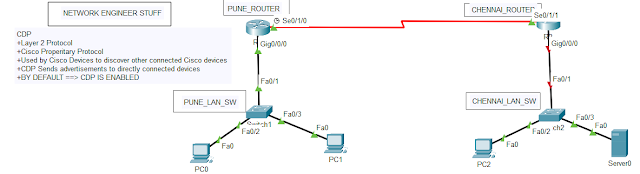
CISCO DISCOVERY PROTOCOL (CDP)

CISCO DISCOVERY PROTOCOL (CDP)


+Layer 2 Protocol

+Cisco Properitary Protocol

+Used by Cisco Devices to discover other connected Cisco devices

+CDP Sends advertisements to directly connected devices

+BY DEFAULT ==> CDP IS ENABLED


CDP


+ CDP is enabled by default

PUNE_ROUTER>show cdp

Global CDP information:

Sending CDP packets every 60 seconds

Sending a holdtime value of 180 seconds

Sending CDPv2 advertisements is enabled


+ CDP Neighbor Output 


PUNE_ROUTER#show cdp neighbors 

Capability Codes: R - Router, T - Trans Bridge, B - Source Route Bridge

                  S - Switch, H - Host, I - IGMP, r - Repeater, P - Phone

Device ID    Local Intrfce   Holdtme    Capability   Platform    Port ID

PUNE_LAN_SW  Gig 0/0/0        152            S       2960        Fas 0/1

CHENNAI_ROUTER

             Ser 0/1/0        150            R       ISR4300     Ser 0/1/1


+ CDP Interfaces


PUNE_ROUTER#show cdp interface

Vlan1 is administratively down, line protocol is down

Sending CDP packets every 60 seconds

Holdtime is 180 seconds

GigabitEthernet0/0/0 is up, line protocol is up

Sending CDP packets every 60 seconds

Holdtime is 180 seconds

GigabitEthernet0/0/1 is administratively down, line protocol is down

Sending CDP packets every 60 seconds

Holdtime is 180 seconds

GigabitEthernet0/0/2 is administratively down, line protocol is down

Sending CDP packets every 60 seconds

Holdtime is 180 seconds

Serial0/1/0 is up, line protocol is up

Sending CDP packets every 60 seconds

Holdtime is 180 seconds

Serial0/1/1 is administratively down, line protocol is down

Sending CDP packets every 60 seconds

Holdtime is 180 seconds

PUNE_ROUTER#


+ CDP Disabled Globally


PUNE_ROUTER(config)#no cdp run

PUNE_ROUTER(config)#do wr

Building configuration...

[OK]

PUNE_ROUTER(config)#do show cdp

% CDP is not enabled

PUNE_ROUTER(config)#


+ CDP Disabled on an interface


PUNE_ROUTER(config)#int serial 0/1/0

PUNE_ROUTER(config-if)#no cdp enable 


Thanks for Reading 


NETWORK ENGINEER STUFF


Sunday, 27 February 2022

HSRP for SVI


AGG_L3_SW1#

*Feb 27 13:41:54.080: HSRP: Vl20 Grp 20 Hello  in  20.1.1.3 Active  pri 100 vIP 20.1.1.1

*Feb 27 13:41:54.090: HSRP: Vl10 Grp 10 Hello  out 10.1.1.2 Active  pri 120 vIP 10.1.1.1

*Feb 27 13:41:54.390: HSRP: Vl10 Grp 10 Hello  in  10.1.1.3 Standby pri 100 vIP 10.1.1.1

*Feb 27 13:41:54.881: HSRP: Vl20 Grp 20 Hello  out 20.1.1.2 Standby pri 100 vIP 20.1.1.1

AGG_L3_SW1#

*Feb 27 13:41:56.648: HSRP: Vl20 Grp 20 Hello  in  20.1.1.3 Active  pri 100 vIP 20.1.1.1

*Feb 27 13:41:56.681: HSRP: Vl10 Grp 10 Hello  out 10.1.1.2 Active  pri 120 vIP 10.1.1.1

*Feb 27 13:41:56.921: HSRP: Vl10 Grp 10 Hello  in  10.1.1.3 Standby pri 100 vIP 10.1.1.1

AGG_L3_SW1#sh standby brief

                     P indicates configured to preempt.

                     |

Interface   Grp  Pri P State   Active          Standby         Virtual IP

Vl10        10   120   Active  local           10.1.1.3        10.1.1.1

Vl20        20   100 P Standby 20.1.1.3        local           20.1.1.1

AGG_L3_SW1#


AGG_L3_SW2#

AGG_L3_SW2#sh standby brief

                     P indicates configured to preempt.

                     |

Interface   Grp  Pri P State   Active          Standby         Virtual IP

Vl10        10   100   Standby 10.1.1.2        local           10.1.1.1

Vl20        20   100   Active  local           20.1.1.2        20.1.1.1

AGG_L3_SW2#

AGG_L3_SW2#

AGG_L3_SW2#


In the above cmd we have P option for preempt to view the status of same - whether configured or not !!!!

AGG_L3_SW1#config t

AGG_L3_SW1(config)#int vlan20

*Feb 27 13:43:42.810: HSRP: Vl20 Grp 20 Hello  out 20.1.1.2 Standby pri 100 vIP 20.1.1.1

AGG_L3_SW1(config-if)#standby 20 priority 110

AGG_L3_SW1(config-if)#

AGG_L3_SW1(config-if)#

*Feb 27 13:43:54.651: HSRP: Vl20 Grp 20 Priority 100 -> 110

*Feb 27 13:43:54.977: HSRP: Vl10 Grp 10 Hello  out 10.1.1.2 Active  pri 120 vIP 10.1.1.1

*Feb 27 13:43:55.231: HSRP: Vl10 Grp 10 Hello  in  10.1.1.3 Standby pri 100 vIP 10.1.1.1

*Feb 27 13:43:55.630: HSRP: Vl20 Grp 20 Hello  in  20.1.1.3 Active  pri 100 vIP 20.1.1.1

*Feb 27 13:43:55.630: HSRP: Vl20 Grp 20 Standby: h/Hello rcvd from lower pri Active router (100/20.1.1.3)

*Feb 27 13:43:55.630: HSRP: Vl20 Grp 20 Active router is local, was 20.1.1.3

*Feb 27 13:43:55.630: HSRP: Vl20 Nbr 20.1.1.3 no longer active for group 20 (Standby)

*Feb 27 13:43:55.630: HSRP: Vl20 Nbr 20.1.1.3 Was active or standby - start passive holddown

*Feb 27 13:43:55.630: HSRP: Vl20 Grp 20 Standby router is unknown, was local

*Feb 27 13:43:55.630: HSRP: Vl20 Interface adv out, Active, active 1 passive 1

*Feb 27 13:43:55.630: HSRP: Vl20 Grp 20 Coup   out 20.1.1.2 Standby pri 110 vIP 20.1.1.1

*Feb 27 13:43:55.631: HSRP: Vl20 Grp 20 Standby -> Active

*Feb 27 13:43:55.631: %HSRP-5-STATECHANGE: Vlan20 Grp 20 state Standby -> Active

*Feb 27 13:43:55.631: HSRP: Vl20 Interface adv out, Active, active 1 passive 0

*Feb 27 13:43:55.631: HSRP: Vl20 Grp 20 Redundancy "hsrp-Vl20-20" state Standby -> Active

*Feb 27 13:43:55.631: HSRP: Vl20 Grp 20 Hello  out 20.1.1.2 Active  pri 110 vIP 20.1.1.1

*Feb 27 13:43:55.632: HSRP: Vl20 Grp 20 Added 20.1.1.1 to ARP (0000.0c07.ac14)

*Feb 27 13:43:55.632: HSRP: Vl20 Grp 20 Activating MAC 0000.0c07.ac14

*Feb 27 13:43:55.632: HSRP: Vl20 Grp 20 Adding 0000.0c07.ac14 to MAC address filter - resetting the interface

*Feb 27 13:43:55.632: HSRP: Vl20 IP Redundancy "hsrp-Vl20-20" standby, local -> unknown

AGG_L3_SW1(config-if)#

*Feb 27 13:43:55.632: HSRP: Vl20 IP Redundancy "hsrp-Vl20-20" update, Standby -> Active

*Feb 27 13:43:55.634: HSRP: Vl20 Interface adv in, Passive, active 0, passive 1, from 20.1.1.3

*Feb 27 13:43:55.634: HSRP: Vl20 Grp 20 Hello  in  20.1.1.3 Speak   pri 100 vIP 20.1.1.1

AGG_L3_SW1(config-if)#

*Feb 27 13:43:57.701: HSRP: Vl10 Grp 10 Hello  in  10.1.1.3 Standby pri 100 vIP 10.1.1.1

*Feb 27 13:43:57.710: HSRP: Vl10 Grp 10 Hello  out 10.1.1.2 Active  pri 120 vIP 10.1.1.1

*Feb 27 13:43:58.541: HSRP: Vl20 Grp 20 Hello  out 20.1.1.2 Active  pri 110 vIP 20.1.1.1

*Feb 27 13:43:58.608: HSRP: Vl20 Grp 20 Hello  in  20.1.1.3 Speak   pri 100 vIP 20.1.1.1

*Feb 27 13:43:58.650: HSRP: Vl20 IP Redundancy "hsrp-Vl20-20" update, Active -> Active

AGG_L3_SW1(config-if)#

*Feb 27 13:44:00.349: HSRP: Vl10 Grp 10 Hello  in  10.1.1.3 Standby pri 100 vIP 10.1.1.1

*Feb 27 13:44:00.578: HSRP: Vl10 Grp 10 Hello  out 10.1.1.2 Active  pri 120 vIP 10.1.1.1

*Feb 27 13:44:01.301: HSRP: Vl20 Grp 20 Hello  out 20.1.1.2 Active  pri 110 vIP 20.1.1.1

*Feb 27 13:44:01.321: HSRP: Vl20 Grp 20 Hello  in  20.1.1.3 Speak   pri 100 vIP 20.1.1.1

AGG_L3_SW1(config-if)#

*Feb 27 13:44:02.992: HSRP: Vl10 Interface adv in, Passive, active 0, passive 1, from 10.1.1.3

*Feb 27 13:44:03.098: HSRP: Vl10 Grp 10 Hello  in  10.1.1.3 Standby pri 100 vIP 10.1.1.1

*Feb 27 13:44:03.463: HSRP: Vl10 Grp 10 Hello  out 10.1.1.2 Active  pri 120 vIP 10.1.1.1

AGG_L3_SW1(config-if)#

*Feb 27 13:44:04.215: HSRP: Vl20 Grp 20 Hello  in  20.1.1.3 Speak   pri 100 vIP 20.1.1.1

*Feb 27 13:44:04.301: HSRP: Vl20 Grp 20 Hello  out 20.1.1.2 Active  pri 110 vIP 20.1.1.1

AGG_L3_SW1(config-if)#

*Feb 27 13:44:05.748: HSRP: Vl10 Grp 10 Hello  in  10.1.1.3 Standby pri 100 vIP 10.1.1.1

*Feb 27 13:44:05.940: HSRP: Vl10 Grp 10 Hello  out 10.1.1.2 Active  pri 120 vIP 10.1.1.1

*Feb 27 13:44:06.252: HSRP: Vl20 Grp 20 Hello  in  20.1.1.3 Standby pri 100 vIP 20.1.1.1

*Feb 27 13:44:06.252: HSRP: Vl20 Grp 20 Standby router is 20.1.1.3

*Feb 27 13:44:06.252: HSRP: Vl20 Nbr 20.1.1.3 is no longer passive

*Feb 27 13:44:06.252: HSRP: Vl20 Nbr 20.1.1.3 standby for group 20

AGG_L3_SW1(config-if)#

*Feb 27 13:44:07.010: HSRP: Vl20 Grp 20 Hello  out 20.1.1.2 Active  pri 110 vIP 20.1.1.1

AGG_L3_SW1(config-if)#

*Feb 27 13:44:08.573: HSRP: Vl10 Grp 10 Hello  out 10.1.1.2 Active  pri 120 vIP 10.1.1.1

*Feb 27 13:44:08.638: HSRP: Vl10 Grp 10 Hello  in  10.1.1.3 Standby pri 100 vIP 10.1.1.1

*Feb 27 13:44:09.155: HSRP: Vl20 Grp 20 Hello  in  20.1.1.3 Standby pri 100 vIP 20.1.1.1

*Feb 27 13:44:09.577: HSRP: Vl20 Grp 20 Hello  out 20.1.1.2 Active  pri 110 vIP 20.1.1.1

AGG_L3_SW1(config-if)#exit

AGG_L3_SW1(config)#

*Feb 27 13:44:11.069: HSRP: Vl10 Grp 10 Hello  out 10.1.1.2 Active  pri 120 vIP 10.1.1.1

*Feb 27 13:44:11.216: HSRP: Vl10 Grp 10 Hello  in  10.1.1.3 Standby pri 100 vIP 10.1.1.1

*Feb 27 13:44:11.594: HSRP: Vl20 Grp 20 Hello  in  20.1.1.3 Standby pri 100 vIP 20.1.1.1

AGG_L3_SW1(config)#

AGG_L3_SW1(config)#un

*Feb 27 13:44:12.571: HSRP: Vl20 Grp 20 Hello  out 20.1.1.2 Active  pri 110 vIP 20.1.1.1

*Feb 27 13:44:13.561: HSRP: Vl10 Grp 10 Hello  out 10.1.1.2 Active  pri 120 vIP 10.1.1.1

AGG_L3_SW1(config)#end

AGG_L3_SW1#

AGG_L3_SW1#

AGG_L3_SW1#un

*Feb 27 13:44:14.104: HSRP: Vl10 Grp 10 Hello  in  10.1.1.3 Standby pri 100 vIP 10.1.1.1

*Feb 27 13:44:14.339: HSRP: Vl20 Grp 20 Hello  in  20.1.1.3 Standby pri 100 vIP 20.1.1.1

*Feb 27 13:44:14.858: %SYS-5-CONFIG_I: Configured from console by console

AGG_L3_SW1#un al

*Feb 27 13:44:15.484: HSRP: Vl20 Grp 20 Hello  out 20.1.1.2 Active  pri 110 vIP 20.1.1.1

*Feb 27 13:44:16.080: HSRP: Vl10 Grp 10 Hello  out 10.1.1.2 Active  pri 120 vIP 10.1.1.1

AGG_L3_SW1#un all

All possible debugging has been turned off

AGG_L3_SW1#

*Feb 27 13:44:16.937: HSRP: Vl10 Grp 10 Hello  in  10.1.1.3 Standby pri 100 vIP 10.1.1.1

*Feb 27 13:44:16.954: HSRP: Vl20 Grp 20 Hello  in  20.1.1.3 Standby pri 100 vIP 20.1.1.1

AGG_L3_SW1#sh standby brief

                     P indicates configured to preempt.

                     |

Interface   Grp  Pri P State   Active          Standby         Virtual IP

Vl10        10   120   Active  local           10.1.1.3        10.1.1.1

Vl20        20   110 P Active  local           20.1.1.3        20.1.1.1


AGG_L3_SW2(config-if)#standby 20 preempt delay minimum 10

AGG_L3_SW2#config t

Enter configuration commands, one per line.  End with CNTL/Z.

AGG_L3_SW2(config)#int vlan20

AGG_L3_SW2(config-if)#standby 20 priority 115

AGG_L3_SW2(config-if)#end

AGG_L3_SW2#

*Feb 27 13:55:51.524: HSRP: Vl20 Grp 20 Hello  out 20.1.1.3 Standby pri 100 vIP 20.1.1.1

*Feb 27 13:55:51.591: HSRP: Vl20 Grp 20 Hello  in  20.1.1.2 Active  pri 110 vIP 20.1.1.1

*Feb 27 13:55:52.069: HSRP: Vl10 Grp 10 Hello  out 10.1.1.3 Standby pri 100 vIP 10.1.1.1

AGG_L3_SW2#

*Feb 27 13:55:52.615: HSRP: Vl20 Grp 20 Priority 100 -> 115

*Feb 27 13:55:52.628: %SYS-5-CONFIG_I: Configured from console by console

AGG_L3_SW2#

*Feb 27 13:55:52.703: HSRP: Vl10 Grp 10 Hello  in  10.1.1.2 Active  pri 120 vIP 10.1.1.1

AGG_L3_SW2#

*Feb 27 13:55:53.970: HSRP: Vl20 Grp 20 Hello  out 20.1.1.3 Standby pri 115 vIP 20.1.1.1

*Feb 27 13:55:54.365: HSRP: Vl20 Grp 20 Hello  in  20.1.1.2 Active  pri 110 vIP 20.1.1.1

*Feb 27 13:55:54.365: HSRP: Vl20 Grp 20 Standby: h/Hello rcvd from lower pri Active router (110/20.1.1.2)

*Feb 27 13:55:54.365: HSRP: Vl20 Grp 20 Starting minimum preempt delay (10 secs)

*Feb 27 13:55:54.601: HSRP: Vl10 Grp 10 Hello  out 10.1.1.3 Standby pri 100 vIP 10.1.1.1

AGG_L3_SW2#

*Feb 27 13:55:55.491: HSRP: Vl10 Grp 10 Hello  in  10.1.1.2 Active  pri 120 vIP 10.1.1.1

*Feb 27 13:55:56.429: HSRP: Vl20 Grp 20 Hello  out 20.1.1.3 Standby pri 115 vIP 20.1.1.1

AGG_L3_SW2#

*Feb 27 13:55:57.248: HSRP: Vl20 Grp 20 Hello  in  20.1.1.2 Active  pri 110 vIP 20.1.1.1

*Feb 27 13:55:57.529: HSRP: Vl10 Grp 10 Hello  out 10.1.1.3 Standby pri 100 vIP 10.1.1.1

*Feb 27 13:55:58.285: HSRP: Vl10 Grp 10 Hello  in  10.1.1.2 Active  pri 120 vIP 10.1.1.1

AGG_L3_SW2#

*Feb 27 13:55:59.174: HSRP: Vl20 Grp 20 Hello  out 20.1.1.3 Standby pri 115 vIP 20.1.1.1

*Feb 27 13:55:59.662: HSRP: Vl20 Grp 20 Hello  in  20.1.1.2 Active  pri 110 vIP 20.1.1.1

*Feb 27 13:56:00.134: HSRP: Vl10 Grp 10 Hello  out 10.1.1.3 Standby pri 100 vIP 10.1.1.1

AGG_L3_SW2#un all

*Feb 27 13:56:01.000: HSRP: Vl10 Grp 10 Hello  in  10.1.1.2 Active  pri 120 vIP 10.1.1.1

*Feb 27 13:56:01.952: HSRP: Vl20 Grp 20 Hello  out 20.1.1.3 Standby pri 115 vIP 20.1.1.1

AGG_L3_SW2#un all

*Feb 27 13:56:02.489: HSRP: Vl20 Grp 20 Hello  in  20.1.1.2 Active  pri 110 vIP 20.1.1.1

*Feb 27 13:56:02.768: HSRP: Vl10 Grp 10 Hello  out 10.1.1.3 Standby pri 100 vIP 10.1.1.1

*Feb 27 13:56:03.513: HSRP: Vl10 Interface adv out, Passive, active 0 passive 1

AGG_L3_SW2#un all

*Feb 27 13:56:03.567: HSRP: Vl10 Grp 10 Hello  in  10.1.1.2 Active  pri 120 vIP 10.1.1.1

*Feb 27 13:56:04.412: HSRP: Vl20 Grp 20 Hello  out 20.1.1.3 Standby pri 115 vIP 20.1.1.1

AGG_L3_SW2#un all

*Feb 27 13:56:05.263: HSRP: Vl20 Grp 20 Hello  in  20.1.1.2 Active  pri 110 vIP 20.1.1.1

*Feb 27 13:56:05.263: HSRP: Vl20 Grp 20 Minimum preempt delay expired

*Feb 27 13:56:05.263: HSRP: Vl20 Grp 20 Active router is local, was 20.1.1.2

*Feb 27 13:56:05.263: HSRP: Vl20 Nbr 20.1.1.2 no longer active for group 20 (Standby)

*Feb 27 13:56:05.263: HSRP: Vl20 Nbr 20.1.1.2 Was active or standby - start passive holddown

*Feb 27 13:56:05.263: HSRP: Vl20 Grp 20 Standby router is unknown, was local

*Feb 27 13:56:05.263: HSRP: Vl20 Interface adv out, Active, active 1 passive 1

*Feb 27 13:56:05.263: HSRP: Vl20 Grp 20 Coup   out 20.1.1.3 Standby pri 115 vIP 20.1.1.1

*Feb 27 13:56:05.263: HSRP: Vl20 Grp 20 Standby -> Active

*Feb 27 13:56:05.263: %HSRP-5-STATECHANGE: Vlan20 Grp 20 state Standby -> Active

*Feb 27 13:56:05.263: HSRP: Vl20 Interface adv out, Active, active 1 passive 0

*Feb 27 13:56:05.263: HSRP: Vl20 Grp 20 Redundancy "hsrp-Vl20-20" state Standby -> Active

*Feb 27 13:56:05.263: HSRP: Vl20 Grp 20 Hello  out 20.1.1.3 Active  pri 115 vIP 20.1.1.1

*Feb 27 13:56:05.263: HSRP: Vl20 Grp 20 Added 20.1.1.1 to ARP (0000.0c07.ac14)

*Feb 27 13:56:05.263: HSRP: Vl20 Grp 20 Activating MAC 0000.0c07.ac14

*Feb 27 13:56:05.263: HSRP: Vl20 Grp 20 Adding 0000.0c07.ac14 to MAC address filter - resetting the interface

*Feb 27 13:56:05.264: HSRP: Vl20 IP Redundancy "hsrp-Vl20-20" standby, local -> unknown

AGG_L3_SW2#un all

All possible debugging has been turned off

AGG_L3_SW2#

*Feb 27 13:56:05.264: HSRP: Vl20 IP Redundancy "hsrp-Vl20-20" update, Standby -> Active

*Feb 27 13:56:05.267: HSRP: Vl20 Interface adv in, Passive, active 0, passive 1, from 20.1.1.2

*Feb 27 13:56:05.267: HSRP: Vl20 Grp 20 Hello  in  20.1.1.2 Speak   pri 110 vIP 20.1.1.1

*Feb 27 13:56:05.786: HSRP: Vl10 Grp 10 Hello  out 10.1.1.3 Standby pri 100 vIP 10.1.1.1

*Feb 27 13:56:06.130: HSRP: Vl10 Grp 10 Hello  in  10.1.1.2 Active  pri 120 vIP 10.1.1.1

AGG_L3_SW2#sh stand

AGG_L3_SW2#sh standby br

AGG_L3_SW2#sh standby brief

                     P indicates configured to preempt.

                     |

Interface   Grp  Pri P State   Active          Standby         Virtual IP

Vl10        10   100   Standby 10.1.1.2        local           10.1.1.1

Vl20        20   115 P Active  local           unknown         20.1.1.1

AGG_L3_SW2#sh standby brief

                     P indicates configured to preempt.

                     |

Interface   Grp  Pri P State   Active          Standby         Virtual IP

Vl10        10   100   Standby 10.1.1.2        local           10.1.1.1

Vl20        20   115 P Active  local           20.1.1.2        20.1.1.1

AGG_L3_SW2#


Thanks for Reading!!!!

Network Engineer Stuff

Wednesday, 29 September 2021

Cisco Packet Tracer - Wireless Router Configuration

 Hello Guys !!!!!!

Welcome to Network Engineer Stuff blog !!!!

In this blog We are going to see How we can configure Wireless router in Cisco packet tracer.


IF YOU NEED THE LAB MAIL US ON :- networkengineerstuff@gmail.com


WIRLESS ROUTER CISCO PACKET TRACER LAB


Lets First Configure the Router 

====================================================================

Router Configuration 
---------------------------------
Router(config)#int gi0/0/0
Router(config-if)#no shut
%LINK-5-CHANGED: Interface GigabitEthernet0/0/0, changed state to up

%LINEPROTO-5-UPDOWN: Line protocol on Interface GigabitEthernet0/0/0, changed state to up

Router(config-if)#ip address 192.168.1.1 255.255.255.0
Router(config-if)#exit

====================================================================

On Laptop --> We need to select the Wireless Card 

and then check the ip address which we will be automatically gained from the wirless router 


Now we can connect the wireless router from the PC using the IP address ---> 192.168.0.1 

Default username & password - admin


Now change the WAN IP which is under Internet Setup 


Now lets change the LAN IP address under Network Setup 


This will interrupt the connection and we will get the timeout 


Lets check if the laptop got the new address 


and ping the PC0 AND PC1


Let change the Wireless router SSID and password 


While changing the Router SSID & password the connection will be interrupted so we have to login again 

 Now lets connect another laptop in the network or pc 


Now lets ping PC1 from PC2


That's successful 

Thanks for Reading !!!!!!

Network Engineer Stuff

Subscribe to Youtube Channel 

Network Engineer Stuff 


Thursday, 29 July 2021

TOP 10 ETHERCHANNEL Interview Questions & Answers

Question 1 – What is Etherchannel and why do we need it ?

Etherchannel is a method of logical bundling of multiple physical links into a single logical channel.

Advantage

More Bandwidth

Redundancy

Also known as Port Aggregation

Question 2 –How many links we can bundle in to one Etherchannel?

Depends upon the negotiation protocol

Incase of LACP - We can combine / bundle upto 16 links in to one Etherchannel   8 active + 8 standby

Incase of PAgP- We can combine / bundle upto 8 links in to one Etherchannel

Question 3 –How many Etherchannels can be configured on a Switch?

The maximum number of supported EtherChannels on a single switch is platform-dependent, though most support up to 64 or 128 EtherChannels.

Catalyst 3550XL switch supports max. 64 ECs.

Catalyst 6500 switch supports max. 128 ECs.

Question 4 –What are the requirements for Etherchannel ?

All the ports must have same Speed & Duplex.

All the ports must be in same switchport mode (Access / Trunk)

If the ports are in Access mode then they should be member of same VLAN.

If the ports are in Trunk mode then they should same Native Vlan , Allowed Vlan and Trunking encapsulation Protocol.

None of the ports in the bundle can be a SPAN port .

Question 5 –Etherchannel is Layer 2 or Layer 3?

We configure both Layer 2 & Layer 3 Etherchannel depending upon the requirement .

Layer 2 Etherchannel – switchport & No IP Address.

Layer 3 Etherchannel – no switchport & Etherchannel will have IP Address.

Question 6 –What are different Etherchannel Modes?

There are multiple modes in Etherchannel :-

On – Manually configured Etherchannel (negotiation is disable)

LACP – Industry Standard

Active -The interface which is configured in this mode will actively try to form the Etherchannel.

Passive - The interface which is configured in this mode will passively try to form the Etherchannel.

PAgP – Cisco Proprietary

Desirable - The interface which is configured in the mode will actively try to form the Etherchannel.

Auto - The interface which is configured in the mode will passively try to form the Etherchannel.

Question 7 –How to configure Etherchannel mode between 2 switches ?

Switch(config)#int range fa0/1-4

Switch(config-if)#channel-group 10 mode <on/auto/desirable/passive/active>

Question 8 –How to troubleshoot the etherchannel when interfaces are configured in LACP Passive mode on both the switches?

If the Interfaces are configured in Passive mode on both the switches then Etherchannel won’t come up .

To troubleshoot we need to configure the interfaces on one switch as Active.                                                                                                                     

Question 9 –What are the load balancing methods supported by Etherchannel?

EtherChannel utilizes a load-balancing algorithm to determine the port to send the traffic out, based on one of several criteria:

 Source IP address - src-ip

 Destination IP address - dst-ip

 Source and destination IP address - src-dst-ip

 Source MAC address - src-mac

 Destination MAC address - dst-mac

 Source and Destination MAC address - src-dst-mac

 Source TCP/UDP port number - src-port

 Destination TCP/UDP port number - dst-port

Source and destination port number - src-dst-port

Question 10 –What is Port Priority value in LACP Etherchannel?

Port Priority is an additional configuration option in LACP.

It is used to determine which ports can become active in Etherchannel and which ports to become standby when there is a limitation that prevents all compatible ports from aggregating.

Values ranges from <1 – 65535 >

Lower value means Higher Priority

Thanks for Reading !!!!

amartechstuff


Switch(config-if)# lacp port-priority “PRIORITY”

Monday, 24 May 2021

HSRP Vs VRRP Vs GLBP


Routing Protocols gives redundancy at layer 3

Redundancy between 2 switches, you connect 2 or more links between them.

Similarly to allow redundancy for your clients, you might want to connect 2 routers as the gateway to exit from the network.

FHRP  First Hop Redundancy Protocol

Gives redundancy at First Hop level gives redundancy at the gateway level

On PC I can configure only one IP address as default gateway. If that device (router) goes down then I would need to configure manually on my PCs the new default gateway.

So from the perspective of PC needs --> First Hop Redundancy

FHRP technology allows the 2 routers to share a single IP address. Or we can say a shared ip address between the 2 routers which is called as the VIP – Virtual IP .where you have the rights to prefer a specific router as forwarding router and another routers as Backup router.

Along with VIP the routers will also share mac address.

Forwarding router is the router which will be answering for the VIP and will forward the traffic .

FHRP establish the relationship between the 2 routers, hellos are exchanges between those routers and incase the forwarding/active/master router goes down then the standby router will become active and will now be answering for the VIP and will forward traffic for the clients.

We have the rights which router to be preferred as forwarding/active/master and backup/standby by manipulating the priority values.

Remember FHRP is the technology it is not the actual implementation.

There are 3 main FHRP Implementations HSRP VRRP AND GLBP

Protocol Features

HSRP -
Hot Standby Protocol

VRRP -
Virtual Redudancy Protocol

GLBP -
Gateway Load
Balancing Protocol

Scope

Cisco Proprietary

IEEE standard

Cisco proprietary

Standard

RFC2281

RFC3768

none

OSI Layer

Layer-3

Layer-3

Layer-2

Load Balancing

No

No

Yes

Multicast Group IP address

224.0.0.2 in version 1 
 224.0.0.102 in version 2

224.0.0.18

224.0.0.102

Transport Port Number

UDP 1985

UDP 112

UDP 3222

Timers

Hello – 3 sec

Advertisement – 1 sec

Hello – 3sec

Hold – 10 sec

Master down time = 3*Advertisement Time
+ Skew TimeSkew
Time = (256- Priority)/256

Hold – 10sec

Election

Active Router:1.Highest Priority2. Highest IP address (Tiebreaker)

Master Router: (*)

Active Virtual Gateway:

1-Highest Priority

1-Highest Priority

2-Highest IP (Tiebreaker)

2-Highest IP (Tiebreaker)

Router Role

One Active Router, One Standby Router , One or more listening Router/s

– One Active Router- One or
 More Backup Routers

One AVG (Active Virtual Gateway)- up to 4 AVF
 Routers on the group
 (Active Virtual Forwarder) passing traffic.
- up to 1024 virtual Routers (GLBP groups)
 per physical interface.

Preempt

If Active Router(Highest Priority) is down and up again, Preempt should be configured to become a Active Router again

 By default Preempt is ON in VRRP,
 If Active Router is down and
up again, It will
automatically become a MasterRouter

If Active Router(Highest Priority) is down
 and up again, Preempt should be configured
 to become a Active Router again.

Group Virtual Mac Address

0000.0c07.acxx

0000.5e00.01xx

0007.b4xx.xxxx

IPv6 support

Yes

No

Yes