Showing posts with label IPSEC VPN. Show all posts

Tuesday, 21 July 2020

IPSEC VPN - EASY TO UNDERSTAND


Youtube Videos Playlist on IPSEC VPN


in Hindi


in English


NOTES ON IPSEC VPN


IPSEC VPN CHAPTER 1 VPN (Virtual Private Network)

https://networkengineerstuff.blogspot.com/2020/07/ipsec-vpn-chapter-1-vpn-virtual-private.html

IPSEC VPN CHAPTER 2 Introduction to IPSec

https://networkengineerstuff.blogspot.com/2020/07/ipsec-vpn-chapter-2-introduction-to.html

IPSEC VPN CHAPTER 3 TERMINOLOGY Part 1

https://networkengineerstuff.blogspot.com/2020/07/ipsec-vpn-chapter-3-terminology-part-1.html

IPSEC VPN CHAPTER 4 TERMINOLOGY Part 2

https://networkengineerstuff.blogspot.com/2020/07/ipsec-vpn-chapter-4-terminology-part-2.html

IPSEC VPN CHAPTER 5 TERMINOLOGY Part 3


IPSEC VPN CHAPTER 6 COMPONENTS & MODES OF IPSEC VPN


IPSEC VPN CHAPTER 7 OPERATION & CONFIGURATION OF IPSEC VPN


Site to Site IPSec VPN Configuration


Few Comments


For Networking Videos and Notes Subscribe to my youtube channel

       a m a r t e c h s t u f f


https://www.youtube.com/channel/UCj-TvHAxKZLOInl_bdGcNqQ?sub_confirmation=1

i n s t a g r a m

https://www.instagram.com/amar.techstuff


B l o g

https://networkengineerstuff.blogspot.com

Monday, 20 July 2020

IPSEC VPN CHAPTER 7 OPERATIONS & CONFIGURATION OF IPSEC VPN


Operations of IPSec VPN


Step 1:- Negotiate the IKE Phase 1 Tunnel (ISAKMP Tunnel).

Step 2 :- DH Key Exchange.

Step 3:- Peer Authentication.

Step 4:- Negotiate the IKE Phase 2 Tunnel (IPSEC Tunnel).


Step 1:- Negotiate the IKE Phase 1 Tunnel (ISAKMP Tunnel).

Peers 1st Negotiate over Public (shared ) Network using IKE Phase 1 .
Also know as ISAKMP Tunnel.
Protects only Management Traffic related to IPSec VPN . (No user Data is Transferred over this Tunnel.)

2 Modes –
•Main Mode – Uses 6 messages , More Secure and Default mode.
•Aggressive Mode – Uses 3 messages and Less Secure

Negotiate 5 Parameters –

“ H A G L E “

•Hashing Algorithm - Integrity - MD5 , SHA
•Authentication - Verification of Peer - Preshared Key (PSK), RSA Signature
•DH Group - Secret Key Exchange -DH1 ,2 ,5 ,14 etc.
•Lifetime - Duration of Tunnel – Default 1 Day = 86400 Seconds
•Encryption - Confidentiality - DES , 3DES ,AES (key size)


Step 2 :- DH Key Exchange.

After IKE Phase 1 negotiation DH ( Diffie Hellman) Key Exchanges are exchange between peers.
Which allows to peers to establish a Shared Secret Key Exchange used by Encryption algorithm (DES ,3DES ) over public network .
It is defined in IKE Phase 1 configuration.

Step 3:- Peer Authentication.

Now Peers Authenticate each other.
The Verification i.e Authentication is done by either using
•Pre-Shared Key (PSK)
•RSA Digital Signature .

Step 4:- Negotiate the IKE Phase 2 Tunnel (IPSEC Tunnel).

IKE Phase 2 is only formed once IKE Phase 1 is formed successfully .
This is also know as IPSec Tunnel.
This Negotiation is not done on public network. It is done on already established secure IKE Phase 1 tunnel . Hence it is completely Private Tunnel.
Here Users traffic is Protected.
Once IKE Phase 2 tunnel is formed then User traffic travel through it .

ALWAYS REMEMBER

In IKE Phase 1 Configuration – We define Policy
In IKE Phase 2 Configuration – We define Transform Set (Encryption – Hashing)

Thanks for Reading

amartechstuff


Friday, 17 July 2020

IPSEC VPN CHAPTER 6 COMPONENTS & MODES OF IPSEC VPN


Components of IPSec VPN

•IPSec uses 3 main protocols to create security framework

•Internet Key Exchange (IKE)


IKE creates a Secure Channel / Tunnel .
Allows 2 devices to exchange Encryption Key and negotiate Security Associations (SA)

•Encapsulating Security Payload (ESP)


Provides – Integrity , Encryption , Authentication & Anti reply
More Secure
Use Protocol Number 50

•Authentication Header (AH)


Provides – Integrity , Authentication & Anti reply
Less Secure
Use Protocol Number 51

ESP AND AH are the IPSec Protocols which provides secure exchange of users data


Modes Of IPSec VPN


•There are 2 modes in which IPSEC VPN can be implemented.
•End –to- End IPSec VPN Tunnel – Transport Mode.
•Site –to- Site IPSec VPN Tunnel - Tunnel Mode.

IPSEC Tunnel Mode VPN


•The original IP Packet (IP Header & Payload) are encapsulated with AH or ESP and an additional IP    Header .
•New IP Header is normally Public IP address.
•Used between Gateways.(Site-to-Site)
•Default Mode of IPSec.


IPSEC Transport Mode VPN


•Only Data Payload is secured by IPSec i.e encapsulated with ESP or AH .
•The IP Headers are the original IP Headers.
•Used for encrypting traffic between 2 Hosts or a host & a VPN gateway i.e End-to-End IP Sec VPN.


Thanks for Reading

amartechstuff


Thursday, 16 July 2020

IPSEC VPN CHAPTER 5 TERMINOLOGY Part 3


Authentication


•IPSec VPN Peer verify each other using Authentication.
•Types –
•RSA Signature
•Pre-shared PSK

RSA Signature


•RSA Signature – Uses digital signature setup.
•Step 1- A creates Public and Private Key .
•Step 2 – A shares its Public with B
•Step 3- A uses a Data packet . Generates a Hash value of same and they encrypt it using Public key . This value is know as Digital Signature.
•Step 4-Digital Signature is send to B.
•Step 5 – B uses A’s Public key to decrypt the Digital Signature get the hash value .
•Hence verify that the data has came from A and not from else.

PSK


•Pre-shared Keys (PSK) – IPSec Peer needs to configured with same pre-shared key.
Here the peers must know each other .
Whereas in Digital Signature authentication is done between peers having no prior knowledge about each other.

Thanks for Reading !!!!

amartechstuff

Tuesday, 14 July 2020

IPSEC VPN CHAPTER 4 TERMINOLOGY Part 2


Diffie-Hellman(DH) Key Exchange


•Published in 1976 by Dr. Diffie & Dr.Hellman
•D-H is a public key cryptography program.
•It allows to peers to establish a Shared Secret Key Exchange used by Encryption algorithm (DES ,3DES ) over public network .
•It is defined in IKE Phase 1 configuration .


DH KEY CALCULATION

•It uses Prime Number (P)
•Prime Number can be divided by itself or 1 only without remainder.
•It also user Generator (G) , Secret Number a , b
•DH Algorithm calculates S1 for A and S2 B
•Then S1 AND S2 values exchanges between A & B.
•Using these values DH Algorithm calculates K1 for A and K2 for B.
•K1 AND K2 ARE SAME
•A and B will use this Sceret key.
•Note :- K1 AND K2 ARE NOT SHARED OVER PUBLIC NETWORK
• a and b secret values are also not shared over Public Network
• P and G are values are shared over Public Network


DH KEY CALCULATION EXAMPLE


Diffie-Hellman(DH) Groups.


DH Group determines the strength of the key exchange.


Hashing

•Data Integrity (no modifications / accuracy) is achieve by Hashing .
• Hashing Algorithm process on the data and results into a Hash Value or Checksum Value which is unique

 Step 1 – A will generate checksum value of data using Hashing algorithm.
•Step 2- A will send data along with data’s checksum value to B.
•Step 3 –B receives the data and runs the same Hashing algorithm to generate the Checksum value .
•Step 4 – B compares both the checksum values .
•If both values are same means B received unmodified data .

•Message – this is amartechstuff
•Hash value - 4046cff3102853721535b14ffc7458a9
•Its very difficult to generate message from Hash value.

Message Digest 5 (MD5)


•Designed by Ronald Rivest in 1991.
•Generates 128 bit Hash Value.
•MD5 has been exploited and MD5 hash value can be break .
•Can use in scenarios where there is almost no possibility of explosion
•Collision exists for numerous text / data.
•Can find number online tools for MD5 hashing

Secure Hash Algorithm (SHA) -Family


Thanks for Reading !!!!!

amartechstuff


Wednesday, 8 July 2020

IPSEC VPN CHAPTER 3 TERMINOLOGY Part 1


Eavesdropper

The attacker who listens to communication between nodes (Here Node A & Node B)

Eavesdropper


Encryption

Encryption is a process of converting clear text into cipher text which help of key and encryption algorithm.

Encryption


Decryption

Decryption is a process of converting cipher text into clear text which help of key and encryption algorithm.

Decryption


Types of Encryption

•Symmetric Encryption

•Asymmetric Encryption

Symmetric Encryption

•In Symmetric Encryption same key is used for Encryption and Decryption.

•Problem with exchange of key .

•Process is fast.

•Cipher Text size is less.

Asymmetric Encryption

•Asymmetric Encryption different keys are used for Encryption and Decryption.

•Public Key-Encryption is done.

•Private Key- Decryption is done.

•No Problem with Exchange of key.

•Cipher Text is large

•More Secure .

Symmetric Encryption Algorithms

•Data Encryption Standard (DES)
-Uses single 56 bits key.
- Weak Security .

•3 Data Encryption Standard (3DES)
- Uses three 64 bits keys.
- Moderate Security.

•Advanced Encryption Standard (AES)
• -Uses Rijndael Alogrithm.
• - Capable of using 128 bits , 192 bits and 256 bits keys.
• - Most Secure Symmetric Encryption Algorithm.

Asymmetric Encryption Algorithms

Rivesh Shamir Adlemen (RSA)

-Was Released in 1978 by Ron Rivest , Adi Shamir & Len Adlemen

-Includes 4 Operational Steps

> Key Generation
> Key Distribution
> Encryption
> Decryption


Thanks for Reading

amartechstuff


Monday, 6 July 2020

IPSEC VPN CHAPTER 2 Introduction to IPSec


IPSec  = Internet Protocol Security

Let's first understand why we need IPSec before moving towards what is IPSec


Why we need IPSec?

• If Data of Enterprise Network is Hacked – It results into Huge Financial Loses .

• Very Important to Securely Transfer Data from Source location to Destination location. 

• TCP/IP Protocol Suite Drawback - Security • IPSec overcomes the same .  


IPSec (Internet Protocol Security)

• IPSec is a Protocol Suite which is a set of Network Security Protocols.

• Developed by IETF (Internet Engineering Task Force)

• Can use on multi Vendor devices e.g – Cisco ,Checkpoint , Juniper etc.

• IPSec is a L3 VPN 
                                     
How IPSec Helps ?

• IPSec helps to Securely transfer Data from Source to Destination.

• Provides – CIAA • Confendiality - Privacy - Encryption

• Integrity – No Modification -Hashing

• Authentication –Sender Receiver Identify each other – Digitial Signature / Preshared key.

• Anti-Replay – Each packet is Unique   

Thanks for Reading

amartechstuff      

Sunday, 5 July 2020

IPSEC VPN CHAPTER 1 VPN (Virtual Private Network)


Consider a company named xyz who have offices across India .

Now Connecting offices across Different locations we need to go for

• WAN technologies  

When we talk about WAN we would consider

• Leased Lines

But the issue with Leased line (which are very secure) is

• Cost  which is very high

Solution to is that we can use

• Internet connectivity to connect offices across different locations.

But the

• Challenge – To transfer Private traffic on Public/ shared network 

• Solution – VPN

VPN (Virtual Private Network)

• Allow the users to send private data over public / shared network securely .

• Provide data confidentiality and data integrity

• Lower operational cost .

• Examples – IPSec VPN , MPLS VPN etc.   
                                                                                                                                                                               
VPN TYPES

• Site to Site VPN – Allows HQ to connects to remote sites offices.

• Remote VPN-Allows remote users to access the corporate network securely.  

Thanks for Reading

amartechstuff


Thursday, 11 June 2020

IPSec - Introduction to Playlist

Hi Guys !!!!!


This is the  new video series which is going to be completely dedicated to IPSec VPN and in this  playlist we are going to focus on the seven chapters and some bonus chapters as well .


CHAPTER 1-VPN

CHAPTER 2-INTRODUCTION OF  IPSec

CHAPTER 3-TERMINOLOGY PART 1

CHAPTER 4-TERMINOLOGY PART 2

CHAPTER 5-TERMINOLOGY PART 3

CHAPTER 6-COMPONENTS & MODES OF IPSec

CHAPTER 7-OPERATION & CONFIGURATION OF IPSec

Bonus Chapters 


This series is for those who are working in networking , network security , routing switching because in our day today's working environment all of us use a lot of  IPsec VPN and it is a very  critical topic.

So starting with this chapter which focuses  on what exactly VPN is, why we need VPN  and how VPN can save some money !!!!


Also we can see why people are moving towards VPN and try to focus more on the introduction of VPN in this introduction chapter.


We will see how VPN makes it possible to securely transfer data from source to destination over a public insecure network.


What is a CIA ? 


 how VPN provides CIA ( Confidentiality Integrity Authentication)


 How Data Securely  is getting transferred from source to destination that will particularly focus on in this chapter and then slowly move towards chapters which are  very important chapters.


So let catch you in coming chapter.


Thanks for reading 


Watch video on IPSEC ON MY YOUTUBE CHANNEL - AMARTECHSTUFF


Sunday, 5 April 2020

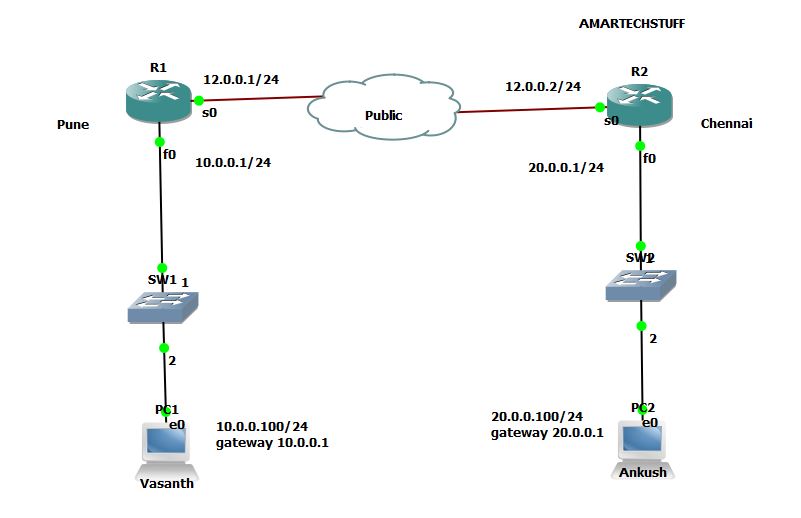
IPSEC SITE TO SITE VPN - TSHOOT

Issue :- not able to ping PC2 from PC1 & viceversa

PC1>ping 20.0.0.100

20.0.0.100 icmp_seq=1415 timeout

20.0.0.100 icmp_seq=1416 timeout

20.0.0.100 icmp_seq=1417 timeout

20.0.0.100 icmp_seq=1418 timeout

20.0.0.100 icmp_seq=1419 timeout


PC2> ping 10.0.0.100

10.0.0.100 icmp_seq=1 timeout

10.0.0.100 icmp_seq=2 timeout

10.0.0.100 icmp_seq=3 timeout

IPSEC VPN TSHOOT 


Let's check ipsec phase 1

R1#sh crypto isakmp sa

dst             src             state          conn-id slot status

12.0.0.2        12.0.0.1        QM_IDLE             41    0 ACTIVE


R2#sh cry isakmp sa

dst             src             state          conn-id slot status

12.0.0.2        12.0.0.1        QM_IDLE             42    0 ACTIVE


IPsec Phase 1 is ACTIVE i.e up

But Phase 2 is not up


R1#sh cry ipsec sa

interface: Serial0

    Crypto map tag: TECHMAP, local addr 12.0.0.1

   protected vrf: (none)

   local  ident (addr/mask/prot/port): (10.0.0.0/255.255.255.0/0/0)

   remote ident (addr/mask/prot/port): (20.0.0.0/255.255.255.0/0/0)

   current_peer 12.0.0.2 port 500

     PERMIT, flags={origin_is_acl,ipsec_sa_request_sent}

    #pkts encaps: 0, #pkts encrypt: 0, #pkts digest: 0   ==================> no packets

    #pkts decaps: 0, #pkts decrypt: 0, #pkts verify: 0

    #pkts compressed: 0, #pkts decompressed: 0

    #pkts not compressed: 0, #pkts compr. failed: 0

    #pkts not decompressed: 0, #pkts decompress failed: 0

    #send errors 1323, #recv errors 0                      ===============> errors

     local crypto endpt.: 12.0.0.1, remote crypto endpt.: 12.0.0.2

     path mtu 1500, ip mtu 1500, ip mtu idb Serial0

     current outbound spi: 0x0(0)
<OUTPUT OMITTED>


R2#sh crypto ipsec sa

interface: Serial0

    Crypto map tag: TECHMAP, local addr 12.0.0.2

   protected vrf: (none)

   local  ident (addr/mask/prot/port): (10.0.0.0/255.255.255.0/0/0)

   remote ident (addr/mask/prot/port): (20.0.0.0/255.255.255.0/0/0)

   current_peer 12.0.0.1 port 500

     PERMIT, flags={origin_is_acl,}

    #pkts encaps: 0, #pkts encrypt: 0, #pkts digest: 0

    #pkts decaps: 0, #pkts decrypt: 0, #pkts verify: 0

    #pkts compressed: 0, #pkts decompressed: 0

    #pkts not compressed: 0, #pkts compr. failed: 0

    #pkts not decompressed: 0, #pkts decompress failed: 0

    #send errors 0, #recv errors 0

     local crypto endpt.: 12.0.0.2, remote crypto endpt.: 12.0.0.1

     path mtu 1500, ip mtu 1500, ip mtu idb Serial0

     current outbound spi: 0x0(0)
<OUTPUT OMITTED>

This is the log getting generated on R1 and R2 when bi-directional traffic is generated


R1#

Jun 21 19:47:21.999: %CRYPTO-4-RECVD_PKT_NOT_IPSEC: Rec'd packet not an IPSEC packet. (ip) vrf/dest_addr= /10.0.0.100, src_addr= 20.0.0.100, prot= 1


R2#

Jun 21 19:40:09.147: %CRYPTO-6-IKMP_MODE_FAILURE: Processing of Quick mode failed with peer at 12.0.0.1

Lets initiate traffic from PC1 to PC2 and on the debug on R1

R1#

Jun 21 19:53:15.783: IP: tableid=0, s=12.0.0.1 (local), d=12.0.0.2 (Serial0), routed via FIB

Jun 21 19:53:15.783: IP: s=12.0.0.1 (local), d=12.0.0.2 (Serial0), len 120, sending

Jun 21 19:53:15.807: IP: tableid=0, s=12.0.0.2 (Serial0), d=12.0.0.1 (Serial0), routed via RIB

Jun 21 19:53:15.807: IP: s=12.0.0.2 (Serial0), d=12.0.0.1 (Serial0), len 120, rcvd 3

R1#

The best commands to start the troubleshooting is -

R1#sh crypto map

Crypto Map "TECHMAP" 10 ipsec-isakmp

        Peer = 12.0.0.2

        Extended IP access list 100

            access-list 100 permit ip 10.0.0.0 0.0.0.255 20.0.0.0 0.0.0.255

        Current peer: 12.0.0.2

        Security association lifetime: 4608000 kilobytes/3600 seconds

        PFS (Y/N): N

        Transform sets={

                TECHSTUFF,

        }

        Interfaces using crypto map TECHMAP:

                Serial0


R2#sh crypto map

Crypto Map "TECHMAP" 10 ipsec-isakmp

        Peer = 12.0.0.1

        Extended IP access list 100

            access-list 100 permit ip 10.0.0.0 0.0.0.255 20.0.0.0 0.0.0.255  ==============> Wrong entry in ACL

        Current peer: 12.0.0.1

        Security association lifetime: 4608000 kilobytes/3600 seconds

        PFS (Y/N): N

        Transform sets={

                TECHSTUFF,

        }

        Interfaces using crypto map TECHMAP:

                Serial0


R2#sh ip access-lists 100

Extended IP access list 100

    10 permit ip 10.0.0.0 0.0.0.255 20.0.0.0 0.0.0.255

R2#config

Configuring from terminal, memory, or network [terminal]?

Enter configuration commands, one per line.  End with CNTL/Z.

R2(config)#

R2(config)#ip access-list ex 100

R2(config-ext-nacl)#no permit ip 10.0.0.0 0.0.0.255 20.0.0.0 0.0.0.255

R2(config-ext-nacl)#permit ip 20.0.0.0 0.0.0.255 10.0.0.0 0.0.0.255

R2(config-ext-nacl)#^Z


Now lets initate traffic from PC1 to PC2


PC1> ping 20.0.0.100

84 bytes from 20.0.0.100 icmp_seq=1 ttl=62 time=59.004 ms

84 bytes from 20.0.0.100 icmp_seq=2 ttl=62 time=34.002 ms

84 bytes from 20.0.0.100 icmp_seq=3 ttl=62 time=34.002 ms

84 bytes from 20.0.0.100 icmp_seq=4 ttl=62 time=47.003 ms

84 bytes from 20.0.0.100 icmp_seq=5 ttl=62 time=34.002 ms


R1#sh crypto ipsec sa

interface: Serial0

    Crypto map tag: TECHMAP, local addr 12.0.0.1

   protected vrf: (none)

   local  ident (addr/mask/prot/port): (10.0.0.0/255.255.255.0/0/0)

   remote ident (addr/mask/prot/port): (20.0.0.0/255.255.255.0/0/0)

   current_peer 12.0.0.2 port 500

     PERMIT, flags={origin_is_acl,}

    #pkts encaps: 72, #pkts encrypt: 72, #pkts digest: 72         ==========>Able to view packets

    #pkts decaps: 72, #pkts decrypt: 72, #pkts verify: 72

    #pkts compressed: 0, #pkts decompressed: 0

    #pkts not compressed: 0, #pkts compr. failed: 0

    #pkts not decompressed: 0, #pkts decompress failed: 0

    #send errors 1601, #recv errors 0

     local crypto endpt.: 12.0.0.1, remote crypto endpt.: 12.0.0.2

     path mtu 1500, ip mtu 1500, ip mtu idb Serial0

     current outbound spi: 0x55840A09(1434716681)

     inbound esp sas:

      spi: 0xF80375FC(4160976380)

        transform: esp-256-aes esp-sha-hmac ,

        in use settings ={Tunnel, }

        conn id: 2001, flow_id: SW:1, crypto map: TECHMAP

        sa timing: remaining key lifetime (k/sec): (4543112/3376)

        IV size: 16 bytes

        replay detection support: Y

        Status: ACTIVE

     inbound ah sas:
     inbound pcp sas:
     outbound esp sas:

      spi: 0x55840A09(1434716681)

        transform: esp-256-aes esp-sha-hmac ,

        in use settings ={Tunnel, }

        conn id: 2002, flow_id: SW:2, crypto map: TECHMAP

        sa timing: remaining key lifetime (k/sec): (4543112/3375)

        IV size: 16 bytes

        replay detection support: Y

        Status: ACTIVE


R2#sh crypto ipsec sa

interface: Serial0

    Crypto map tag: TECHMAP, local addr 12.0.0.2

   protected vrf: (none)

   local  ident (addr/mask/prot/port): (20.0.0.0/255.255.255.0/0/0)

   remote ident (addr/mask/prot/port): (10.0.0.0/255.255.255.0/0/0)

   current_peer 12.0.0.1 port 500

     PERMIT, flags={origin_is_acl,}

    #pkts encaps: 72, #pkts encrypt: 72, #pkts digest: 72

    #pkts decaps: 72, #pkts decrypt: 72, #pkts verify: 72

    #pkts compressed: 0, #pkts decompressed: 0

    #pkts not compressed: 0, #pkts compr. failed: 0

    #pkts not decompressed: 0, #pkts decompress failed: 0

    #send errors 0, #recv errors 0

     local crypto endpt.: 12.0.0.2, remote crypto endpt.: 12.0.0.1

     path mtu 1500, ip mtu 1500, ip mtu idb Serial0

     current outbound spi: 0xF80375FC(4160976380)

     inbound esp sas:

      spi: 0x55840A09(1434716681)

        transform: esp-256-aes esp-sha-hmac ,


In this ticket we saw how a wrong entry in the interesting traffic ACL would create a issue .


Hope You all liked this !!!!!!


Thank You!!!!!

Saturday, 14 March 2020

Operations of IPSec VPN

Step 1:- Negotiate the IKE Phase 1 Tunnel (ISAKMP Tunnel).

Peers 1st Negotiate over Public (shared ) Network using IKE Phase 1 .
Also know as ISAKMP Tunnel.
Protects only Management Traffic related to IPSec VPN . (No user Data is Transferred over this Tunnel.)

Negotiate 5 Parameters –
 “  H A G L E  “
Hashing Algorithm -  Integrity - MD5 , SHA
Authentication  - Verification of  Peer - Preshared  Key (PSK), RSA Signature
DH Group  - Secret Key Exchange -DH1 ,2 ,5 ,14 etc.
Lifetime  - Duration of Tunnel – Default 1 Day = 86400 Seconds
Encryption  - Confidentiality - DES ,  3DES ,AES (key size)


Step 2 :- DH Key Exchange.

After IKE Phase 1 negotiation DH ( Diffie Hellman) Key Exchanges are exchange between peers.

Which allows to peers to establish  a Shared Secret Key Exchange used by Encryption algorithm (DES ,3DES ) over public network .

It is defined in IKE Phase 1 configuration


Step 3:- Peer Authentication.

Now Peers Authenticate each other.

The Verification i.e Authentication is done by either using
Pre-Shared Key (PSK)
RSA Digital Signature .


Step 4:- Negotiate the IKE Phase 2 Tunnel (IPSEC Tunnel).

IKE Phase 2 is only formed once IKE Phase 1 is formed successfully .
This is also know as IPSec Tunnel.
This Negotiation is not done on public network. It is done on already established secure IKE Phase 1 tunnel . Hence it is completely Private Tunnel.
Here Users traffic is Protected.
Once IKE Phase 2 tunnel is formed then User traffic travel through it .


Tip :-

In IKE Phase 1 Configuration – We define Policy
In IKE Phase 2 Configuration – We define Transform Set (Encryption – Hashing)

Thanks for Reading !!!!! 

Friday, 13 March 2020

SITE TO SITE IPSEC VPN CONFIGURATION

Let's  start

SITE - TO -SITE IPSEC VPN CONFIGURATION


INTERFACES STATUS
=========================

R1#sh int des | i up
Fa0                            up             up       LAN
Se0                            up             up       WAN
R1#sh ip int brief | i up
FastEthernet0              10.0.0.1        YES NVRAM  up                    up
Serial0                    12.0.0.1        YES NVRAM  up                    up

R2#sh int des | i up
Fa0                            up             up       LAN
Se0                            up             up       WAN
R2#sh ip int brief | i up
FastEthernet0              20.0.0.1        YES NVRAM  up                    up
Serial0                    12.0.0.2        YES NVRAM  up                    up

ABLE TO PING FROM PC1 TO PC2 & VICEVERSA
=========================================
PC1> ping 20.0.0.100
84 bytes from 20.0.0.100 icmp_seq=1 ttl=62 time=36.002 ms
84 bytes from 20.0.0.100 icmp_seq=2 ttl=62 time=58.003 ms
84 bytes from 20.0.0.100 icmp_seq=3 ttl=62 time=43.003 ms
84 bytes from 20.0.0.100 icmp_seq=4 ttl=62 time=43.003 ms
84 bytes from 20.0.0.100 icmp_seq=5 ttl=62 time=44.002 ms

PC2> ping 10.0.0.100
84 bytes from 10.0.0.100 icmp_seq=1 ttl=62 time=54.003 ms
84 bytes from 10.0.0.100 icmp_seq=2 ttl=62 time=53.003 ms
84 bytes from 10.0.0.100 icmp_seq=3 ttl=62 time=42.002 ms
84 bytes from 10.0.0.100 icmp_seq=4 ttl=62 time=38.002 ms
84 bytes from 10.0.0.100 icmp_seq=5 ttl=62 time=40.002 ms

Step 1:-  Create ACL to define Interesting Traffic.
Step 2:- Define parameters for IKE Phase1 Tunnel (ISAKMP Tunnel)
      a) Enable Crypto ISAKMP
      b) Configure HAGLE PARAMTERS
      c) Set peer & key
Step 3:- Define parameters for IKE Phase2 Tunnel (IPSec Tunnel)
Step 4 :- Create Crypto map and apply to the appropriate interface.

**** every command begins with crypto ****

STEP 1  - Create ACL to define "Interesting" Traffic
=====================================================

R1(config)#access-list 100 permit ip 10.0.0.0 0.0.0.255 20.0.0.0 0.0.0.255
R2(config)#access-list 100 permit ip 20.0.0.0 0.0.0.255 10.0.0.0 0.0.0.255

note :- we can acls with different acl numbers on both the vpn devices.

STEP 2 - Define parameters for IKE Phase 1 Tunnel (ISAKMP Tunnel)
==================================================================
a) Enable Crypto ISAKMP
==================================================================
R1#sh crypto isakmp policy
ISAKMP is turned off
R2#sh crypto isakmp policy
ISAKMP is turned off

R1(config)#crypto isakmp enable
Mar 13 02:24:38.171: %CRYPTO-6-ISAKMP_ON_OFF: ISAKMP is ON
R1#sh cry isakmp policy

Global IKE policy
Default protection suite
        encryption algorithm:   DES - Data Encryption Standard (56 bit keys).
        hash algorithm:         Secure Hash Standard
        authentication method:  Rivest-Shamir-Adleman Signature
        Diffie-Hellman group:   #1 (768 bit)
        lifetime:               86400 seconds, no volume limit


NOTE :- By default there is one IKE PHASE 1 ISAKMP Policy present.

R2(config)#crypto isakmp enable
Mar 13 02:26:44.519: %CRYPTO-6-ISAKMP_ON_OFF: ISAKMP is ON

b) Configure HAGLE PARAMTERS
==================================================================
R1(config)#crypto isakmp policy 10
R1(config-isakmp)#hash sha
R1(config-isakmp)#authentication pre-share
R1(config-isakmp)#group 5
R1(config-isakmp)#encryption aes
R1(config-isakmp)#^Z

R1#sh crypto isakmp policy

Global IKE policy
Protection suite of priority 10
        encryption algorithm:   AES - Advanced Encryption Standard (128 bit keys).
        hash algorithm:         Secure Hash Standard
        authentication method:  Pre-Shared Key
        Diffie-Hellman group:   #5 (1536 bit)
        lifetime:               86400 seconds, no volume limit
Default protection suite
        encryption algorithm:   DES - Data Encryption Standard (56 bit keys).
        hash algorithm:         Secure Hash Standard
        authentication method:  Rivest-Shamir-Adleman Signature
        Diffie-Hellman group:   #1 (768 bit)
        lifetime:               86400 seconds, no volume limit

R2(config)#crypto isakmp policy 10
R2(config-isakmp)#hash sha
R2(config-isakmp)#authentication pre-share
R2(config-isakmp)#group 5
R2(config-isakmp)#encryption aes
R2(config-isakmp)#^Z

R2#sh crypto isakmp policy

Global IKE policy
Protection suite of priority 10
        encryption algorithm:   AES - Advanced Encryption Standard (128 bit keys).
        hash algorithm:         Secure Hash Standard
        authentication method:  Pre-Shared Key
        Diffie-Hellman group:   #5 (1536 bit)
        lifetime:               86400 seconds, no volume limit
Default protection suite
        encryption algorithm:   DES - Data Encryption Standard (56 bit keys).
        hash algorithm:         Secure Hash Standard
        authentication method:  Rivest-Shamir-Adleman Signature
        Diffie-Hellman group:   #1 (768 bit)
        lifetime:               86400 seconds, no volume limit

c) Set peer & key
==================================================================
R1(config)#crypto isakmp key ?
  0  Specifies an UNENCRYPTED password will follow
  6  Specifies an ENCRYPTED password will follow
  note - both the keys will go encrypted over public network ...it is how the key will be locally

R1(config)#crypto isakmp key 0 cisco123 address 12.0.0.2
R1#sh crypto isakmp key
Keyring               Hostname/Address                   Preshared Key

default               12.0.0.2                           cisco123

R2(config)#crypto isakmp key 0 cisco123 address 12.0.0.1

R2#sh crypto isakmp key
Keyring               Hostname/Address                   Preshared Key

default               12.0.0.1                           cisco123
R2#

====================================================================================================================================
Step 3:- Define parameters for IKE Phase2 Tunnel (IPSec Tunnel)
==================================================================

R1(config)#crypto ipsec transform-set AMARTECH esp-aes 128 esp-md5-hmac
R1(cfg-crypto-trans)#^Z
R1#sh crypto ipsec transform-set
Transform set AMARTECH: { esp-aes esp-md5-hmac  }
   will negotiate = { Tunnel,  },
R2(config)#crypto ipsec transform-set AMARTECH esp-aes 128 esp-md5-hmac
R2(cfg-crypto-trans)#^Z
R2#
R2#config
Mar 13 03:07:38.415: %SYS-5-CONFIG_I: Configured from console by console
R2#sh crypto ipsec transform-set
Transform set AMARTECH: { esp-aes esp-md5-hmac  }
   will negotiate = { Tunnel,  },

====================================================================
Step 4 :- Create Crypto map and apply to the appropriate interface.
====================================================================

R1(config)#crypto map TECHMAP 10 ipsec-isakmp
% NOTE: This new crypto map will remain disabled until a peer
        and a valid access list have been configured.
R1(config-crypto-map)#set peer 12.0.0.2
R1(config-crypto-map)#match address 100
R1(config-crypto-map)#set transform-set AMARTECH
R1(config-crypto-map)#^Z


R2(config)#crypto map TECHMAP 10 IPsec-ISakmp
% NOTE: This new crypto map will remain disabled until a peer
        and a valid access list have been configured.
R2(config-crypto-map)#set peer 12.0.0.1
R2(config-crypto-map)#match address 100
R2(config-crypto-map)#set transform-set AMARTECH
R2(config-crypto-map)#^Z

R1#sh crypto map
Crypto Map "TECHMAP" 10 ipsec-isakmp
        Peer = 12.0.0.2
        Extended IP access list 100
            access-list 100 permit ip 10.0.0.0 0.0.0.255 20.0.0.0 0.0.0.255
        Security association lifetime: 4608000 kilobytes/3600 seconds
        PFS (Y/N): N
        Transform sets={
                AMARTECH,
        }
        Interfaces using crypto map TECHMAP:

R2#sh crypto ma
Crypto Map "TECHMAP" 10 ipsec-isakmp
        Peer = 12.0.0.1
        Extended IP access list 100
            access-list 100 permit ip 20.0.0.0 0.0.0.255 10.0.0.0 0.0.0.255
        Security association lifetime: 4608000 kilobytes/3600 seconds
        PFS (Y/N): N
        Transform sets={
                AMARTECH,
        }
        Interfaces using crypto map TECHMAP:

R1(config)#int s0
R1(config-if)#crypto map TECHMAP
R1(config-if)#^Z
R1#

R1#sh crypto map
Crypto Map "TECHMAP" 10 ipsec-isakmp
        Peer = 12.0.0.2
        Extended IP access list 100
            access-list 100 permit ip 10.0.0.0 0.0.0.255 20.0.0.0 0.0.0.255
        Current peer: 12.0.0.2
        Security association lifetime: 4608000 kilobytes/3600 seconds
        PFS (Y/N): N
        Transform sets={
                AMARTECH,
        }
        Interfaces using crypto map TECHMAP:
                Serial0

R2(config)#int s0
R2(config-if)#cry
R2(config-if)#crypto map TECHMAP
R2(config-if)#^Z
R2#sh crypto map
Crypto Map "TECHMAP" 10 ipsec-isakmp
        Peer = 12.0.0.1
        Extended IP access list 100
            access-list 100 permit ip 20.0.0.0 0.0.0.255 10.0.0.0 0.0.0.255
        Current peer: 12.0.0.1
        Security association lifetime: 4608000 kilobytes/3600 seconds
        PFS (Y/N): N
        Transform sets={
                AMARTECH,
        }
        Interfaces using crypto map TECHMAP:
                Serial0

========================================================================

R1#sh cry isakmp sa
dst             src             state          conn-id slot status

R1#sh cry ipsec
R1#sh cry ipsec sa

interface: Serial0
    Crypto map tag: TECHMAP, local addr 12.0.0.1

   protected vrf: (none)
   local  ident (addr/mask/prot/port): (10.0.0.0/255.255.255.0/0/0)
   remote ident (addr/mask/prot/port): (20.0.0.0/255.255.255.0/0/0)
   current_peer 12.0.0.2 port 500
     PERMIT, flags={origin_is_acl,}
    #pkts encaps: 0, #pkts encrypt: 0, #pkts digest: 0
    #pkts decaps: 0, #pkts decrypt: 0, #pkts verify: 0
    #pkts compressed: 0, #pkts decompressed: 0
    #pkts not compressed: 0, #pkts compr. failed: 0
    #pkts not decompressed: 0, #pkts decompress failed: 0
    #send errors 0, #recv errors 0

     local crypto endpt.: 12.0.0.1, remote crypto endpt.: 12.0.0.2
     path mtu 1500, ip mtu 1500, ip mtu idb Serial0
     current outbound spi: 0x0(0)

     inbound esp sas:

     inbound ah sas:

     inbound pcp sas:

     outbound esp sas:

     outbound ah sas:

     outbound pcp sas:

======================================================================================================

R1#sh cry isakmp sa
dst             src             state          conn-id slot status
12.0.0.2        12.0.0.1        QM_IDLE              1    0 ACTIVE

R2#sh cry isakmp sa
dst             src             state          conn-id slot status
12.0.0.2        12.0.0.1        QM_IDLE              1    0 ACTIVE


R1#sh cry ipsec sa

interface: Serial0
    Crypto map tag: TECHMAP, local addr 12.0.0.1

   protected vrf: (none)
   local  ident (addr/mask/prot/port): (10.0.0.0/255.255.255.0/0/0)
   remote ident (addr/mask/prot/port): (20.0.0.0/255.255.255.0/0/0)
   current_peer 12.0.0.2 port 500
     PERMIT, flags={origin_is_acl,}
    #pkts encaps: 21, #pkts encrypt: 21, #pkts digest: 21
    #pkts decaps: 21, #pkts decrypt: 21, #pkts verify: 21
    #pkts compressed: 0, #pkts decompressed: 0
    #pkts not compressed: 0, #pkts compr. failed: 0
    #pkts not decompressed: 0, #pkts decompress failed: 0
    #send errors 1, #recv errors 0

     local crypto endpt.: 12.0.0.1, remote crypto endpt.: 12.0.0.2
     path mtu 1500, ip mtu 1500, ip mtu idb Serial0
     current outbound spi: 0xA9BA9F1(177973745)

     inbound esp sas:
      spi: 0x3637026C(909574764)
        transform: esp-aes esp-md5-hmac ,
        in use settings ={Tunnel, }
        conn id: 2002, flow_id: SW:2, crypto map: TECHMAP
        sa timing: remaining key lifetime (k/sec): (4525445/3524)
        IV size: 16 bytes
        replay detection support: Y
        Status: ACTIVE

     inbound ah sas:

     inbound pcp sas:

     outbound esp sas:
      spi: 0xA9BA9F1(177973745)
        transform: esp-aes esp-md5-hmac ,
        in use settings ={Tunnel, }
        conn id: 2001, flow_id: SW:1, crypto map: TECHMAP
        sa timing: remaining key lifetime (k/sec): (4525445/3522)
        IV size: 16 bytes
        replay detection support: Y
        Status: ACTIVE

     outbound ah sas:

     outbound pcp sas:

R2#sh crypto ipsec sa

interface: Serial0
    Crypto map tag: TECHMAP, local addr 12.0.0.2

   protected vrf: (none)
   local  ident (addr/mask/prot/port): (20.0.0.0/255.255.255.0/0/0)
   remote ident (addr/mask/prot/port): (10.0.0.0/255.255.255.0/0/0)
   current_peer 12.0.0.1 port 500
     PERMIT, flags={origin_is_acl,}
    #pkts encaps: 67, #pkts encrypt: 67, #pkts digest: 67
    #pkts decaps: 67, #pkts decrypt: 67, #pkts verify: 67
    #pkts compressed: 0, #pkts decompressed: 0
    #pkts not compressed: 0, #pkts compr. failed: 0
    #pkts not decompressed: 0, #pkts decompress failed: 0
    #send errors 0, #recv errors 0

     local crypto endpt.: 12.0.0.2, remote crypto endpt.: 12.0.0.1
     path mtu 1500, ip mtu 1500, ip mtu idb Serial0
     current outbound spi: 0x3637026C(909574764)

     inbound esp sas:
      spi: 0xA9BA9F1(177973745)
        transform: esp-aes esp-md5-hmac ,
        in use settings ={Tunnel, }
        conn id: 2002, flow_id: SW:2, crypto map: TECHMAP
        sa timing: remaining key lifetime (k/sec): (4467647/3445)
        IV size: 16 bytes
        replay detection support: Y
        Status: ACTIVE

     inbound ah sas:

     inbound pcp sas:

     outbound esp sas:
      spi: 0x3637026C(909574764)
        transform: esp-aes esp-md5-hmac ,
        in use settings ={Tunnel, }
        conn id: 2001, flow_id: SW:1, crypto map: TECHMAP
        sa timing: remaining key lifetime (k/sec): (4467647/3443)
        IV size: 16 bytes
        replay detection support: Y
        Status: ACTIVE

     outbound ah sas:

     outbound pcp sas:


Thanks for Reading !!!!!!

Wednesday, 11 March 2020

14 SHOW COMMANDS FOR IPSEC VPN

  1. sh crypto isakmp policy
  2. sh crypto isakmp sa
  3. sh crypto isakmp peer
  4. sh crypto isakmp key
  5. sh crypto ipsec transform-set
  6. sh cry ipsec sa
  7. sh crypto map
  8. sh crypto map interface serial 0
  9. sh crypto engine brief
  10. sh crypto engine configuration
  11. sh crypto engine connections active
  12. sh crypto engine connections flow
  13. sh crypto engine connections dropped-packet
  14. sh crypto call admission statistics

IPSEC VPN SHOW COMMANDS

1) R1#sh crypto isakmp policy

Global IKE policy
Protection suite of priority 10
        encryption algorithm:   AES - Advanced Encryption Standard (128 bit keys).
        hash algorithm:         Secure Hash Standard
        authentication method:  Pre-Shared Key
        Diffie-Hellman group:   #5 (1536 bit)
        lifetime:               86400 seconds, no volume limit
Default protection suite
        encryption algorithm:   DES - Data Encryption Standard (56 bit keys).
        hash algorithm:         Secure Hash Standard
        authentication method:  Rivest-Shamir-Adleman Signature
        Diffie-Hellman group:   #1 (768 bit)
        lifetime:               86400 seconds, no volume limit